
CKP Checkout Integration
In CKP (Checkout Page) mode, the merchant redirects the buyer to Paydify's hosted checkout page, which orchestrates the wallet handoff and completes the payment. CKP is the lowest-effort, broadest-coverage option for Payin and is the recommended starting point.
| Aspect | Notes |
|---|---|
| UX | Excellent |
| Effort | Low |
| Platforms | WAP / App on mobile; PC auto-falls back to a scannable QR code |
Interaction
The merchant redirects the buyer to Paydify's hosted checkout page, where the buyer picks a wallet and completes the payment.
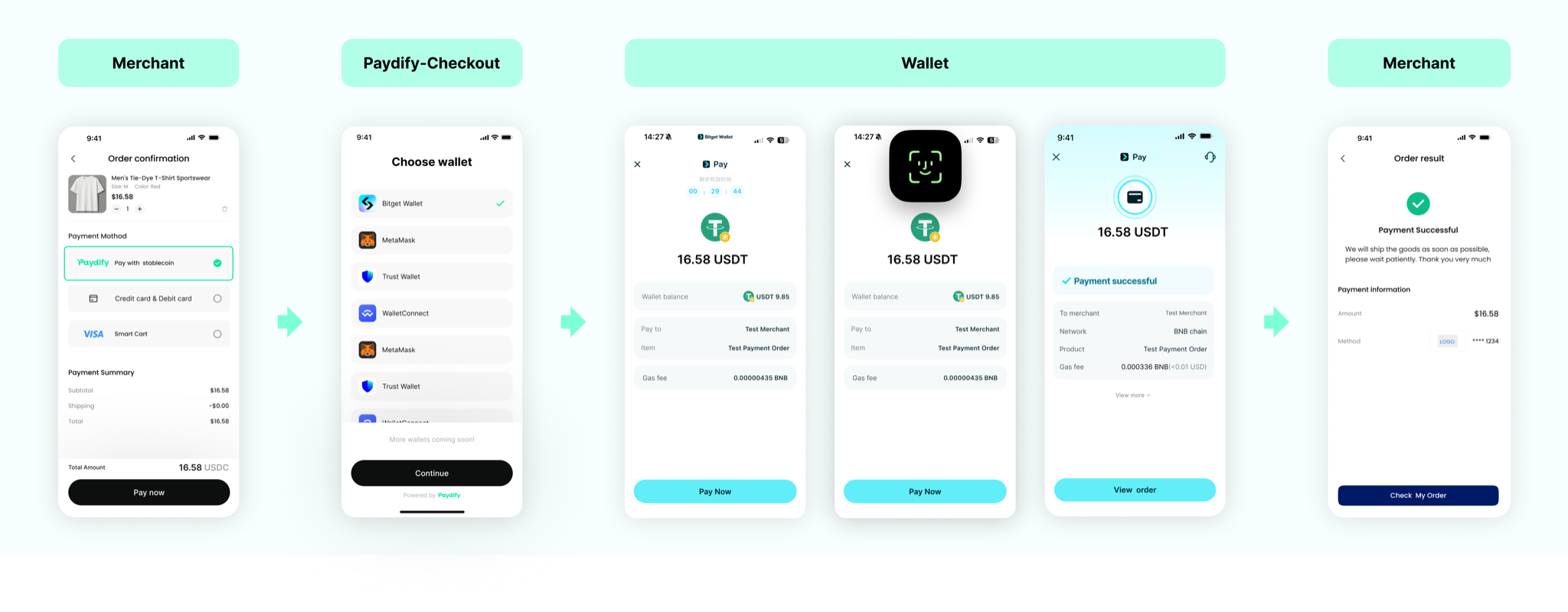
Prerequisites
Before integrating, make sure you have:
- Completed KYC and received your
PartnerID,x-api-keyandx-api-secret(available under merchant Portal - Developer Center); - Reviewed the Service domain and Request / Response docs;
- Installed the server-side SDK (recommended — it encapsulates signing / verification). See Developer resources.
Integration steps
Sequence
Step 1 — Sign / verify
Every request to Paydify and every webhook delivered by Paydify carries a signature. Signing proves to both sides that "this call really came from us" and prevents tampering.
Recommended: use a Paydify server-side SDK (Java / Node.js / Python / PHP, etc.). The SDK encapsulates the signing routine; you only need to inject x-api-key and x-api-secret.
If you implement it yourself: see Signature. Key constraints:
- Every signed request carries 2 HTTP headers:
x-api-key/x-api-timestamp; - Server clocks (yours and Paydify's) must stay accurate (NTP recommended), otherwise requests are rejected as "expired";
- You must verify the signature on incoming webhooks too — reject anything that fails verification, otherwise spoofed callbacks can corrupt your order state.
Step 2 — Create a payment order on the server
Call POST /payin/v1/createPayment from your server to open a payment session and redirect to the Paydify checkout page. Pay attention to the following fields:
| Field | Type | Required | Description |
|---|---|---|---|
mchTxnId | string(60) | Yes | Merchant-side order ID, up to 60 chars, used as the idempotency key |
txnAmount | string(20) | Yes | Order amount, e.g. 100.23 |
currency | string(8) | Yes | Currency of txnAmount. What you may pass depends on your app's product type (chosen once at onboarding; a mismatched currency is rejected, nothing is auto-converted): a stablecoin acquiring app passes USDT / USDC (user pays the exact amount); a fiat acquiring app passes USD / SGD, etc. (auto-converted to stablecoin at the real-time rate). See Supported chains and currencies |
payMethod1 | string(20) | No | Wallet used for payment — see Supported chains and currencies; not required in CKP checkout mode |
payMethod2 | string(20) | No | Chain used for payment — see Supported chains and currencies |
notificationUrl | string(300) | Yes | Webhook URL for payment results, https only |
successReturnUrl | string(300) | No | URL to redirect to after a successful payment |
failReturnUrl | string(300) | No | URL to redirect to after a failed payment |
pendingReturnUrl | string(300) | No | URL to redirect to when the user pauses payment |
accountInfo | object[] | No | Collection account info list, e.g. [{"toAddress":"0xttttttt22222","network":"ETH"}]. Element fields: toAddress (receiving address, required when the element is present), network (target chain such as ETH / BSC / SOL / TRX / BASE, optional; falls back to outer payMethod2 if omitted). Only effective for DEX transactions, settling funds directly to that address; omit or pass an empty array to use the DEX collection address configured in Merchant Portal → App details; legacy single-object form is still accepted |
lifetime | int | No | Order TTL in milliseconds (default 30 minutes) |
merchantId | string(60) | No | Merchant ID of the order owner (sub-merchant). Required when calling with a partner credential on behalf of a sub-merchant; can be omitted with a merchant-owned credential (defaults to the credential owner). Max 60 characters |
merchantAppId | string(64) | No | App ID under the owner merchant, used for disambiguation when the owner merchant has multiple authorized apps. Required if the credential covers multiple apps of the owner merchant; can be omitted when only one app is authorized (resolved automatically). Max 64 characters |
For additional fields (
source/txnTitle/txnDesc/payerInfo/mchExtInfo), see API Reference · Create payment.
Request example:
{
  "mchTxnId": "MCH_TXN_20260610_002",
  "txnAmount": "0.01",
  "currency": "USDT",
  "checkoutMode": "MERCHANT",
  "payMethod1": "",
  "payMethod2": "",
  "notificationUrl": "https://your-domain.com/api/payment/notify",
  "successReturnUrl": "https://your-domain.com/pay/success",
  "failReturnUrl": "https://your-domain.com/pay/fail",
  "pendingReturnUrl": "https://your-domain.com/pay/pending",
  "txnTitle": "Test Payment Order",
  "source": "web",
  "txnDesc": "Payment for test product",
  "accountInfo": [
    {
      "toAddress": "0x1111111111222222222233333333334444444444",
      "network": "ETH"
    }
  ],
  "payerInfo": {
    "uid": "USER_123456"
  },
  "mchExtInfo": "{\"orderId\":\"ORD_2025081201\",\"productId\":\"PROD_001\"}"
}
Response example:
// Successful response
{
  "code": "SYS_SUCCESS",
  "message": null,
  "messageDetail": null,
  "data": {
    "txnId": "P1167515578018041857",
    "mchTxnId": "MCH_TXN_20260610_002",
    "state": "INIT",
    "errorMsg": "",
    "qrCode": "data:image/png;base64,iVBORw0KGgoAAAANSU...",
    "deeplink": "bitkeep://pay?txnId=P20250827173005906",
    "httplink": "https://payrouter.paydify.com/en/pay/middle?txnId=P1167515578018041857&_needChain=base"
  },
  "success": true
}

// Failed response
{
  "code": "SYS_ERROR",
  "message": "System error",
  "messageDetail": "Error details",
  "data": null,
  "success": false
}
In CKP mode you mainly consume data.httplink.
Step 3 — Redirect the client to the Paydify checkout
Pass data.httplink from the createPayment response back to your front-end and redirect the user:
<a href="{{httplink}}" target="_self">Pay now</a>
The Paydify checkout auto-adapts to the device:
- Mobile — automatically tries to launch the user's wallet app;
- Desktop browsers — renders a QR code so the user can scan with a mobile wallet.
payrouter.paydify.com.
When the user returns to your site
When the checkout flow completes, Paydify redirects back to the URL you supplied in step 2:
| Outcome | Redirect URL |
|---|---|
| Payment succeeded | successReturnUrl |
| Payment failed | failReturnUrl |
| User backed out mid-flow | pendingReturnUrl |
Step 4 — Get the result (belt and braces)
After creating an order, integrate both the asynchronous webhook and the active query — that pair is the belt-and-braces guarantee:
- Webhook (primary) — Paydify pushes state changes with minimal delay;
- Active query (fallback) — covers network jitter or temporary outages on your callback endpoint.
4.1 Receive the webhook
Paydify sends a POST to your notificationUrl whenever the order state changes. The body is JSON; the headers carry the signature fields described in step 1. Full details on receiving, verifying, replying, and retrying live in Webhook.
The four facts you must internalize:
- Verify the signature — reject (
HTTP 400) + log alert on failure; do not continue with business logic; - Be idempotent — the same
txnIdmay be delivered more than once (jitter, retries, multiple on-chain events). Deduplicate bytxnId + state; - Reply correctly — return
HTTP 200with body"SUCCESS". Paydify only considers the delivery successful when it sees this response; any other response (including HTTP 200 with a non-SUCCESS body) triggers an automatic retry; - Auto-retry — failures are retried up to 7 times at
1m / 5m / 30m / 2h / 6h / 12h / 24hintervals; deliveries that still fail raise an alert. See Webhook.
Webhook payload example:
{
  "txnId": "P5081643613805693697",
  "mchTxnId": "dcb97435-6713-4129-b428-2340c61c5605",
  "state": "PAID",
  "txnAmount": "0.01",
  "currency": "USDT",
  "paidAmount": "0.01",
  "paidCurrency": "USDT",
  "paidNetwork": "BNB",
  "paidTime": 1780971481993,
  "txnHash": "0x1234567890abcdef1234567890abcdef1234567890abcdef1234567890abcdef",
  "fromAddress": "0x5555555555666666666677777777778888888888",
  "toAddress": "0x1111111111222222222233333333334444444444",
  "fee": "0",
  "errorMsg": "",
  "mchExtInfo": "{\"orderId\":\"ORD_2025081201\",\"productId\":\"PROD_001\"}"
}
Merchant reply example:
- HTTP status:
200 Content-Type: text/plain- Body (raw string, case-insensitive):
success
The following replies are also accepted as success (no further retries):
success/SUCCESS/Success- Leading / trailing whitespace or newline:
success,success\n
The following replies are treated as failure and trigger a retry:
- JSON objects:
{"status":"success"}/{"code":0}/{"result":"success"} - HTML error pages or an empty body
- Any literal other than
success(includingfail)
4.2 Active query
See Query payment status.
Endpoint: POST /payin/v1/getPaymentStatus
Request (txnId or mchTxnId, one of two):
| Field | Required | Description |
|---|---|---|
txnId | One of two | Paydify order ID returned by createPayment |
mchTxnId | One of two | The merchant order ID supplied to createPayment. If you pass both, txnId wins |
merchantId | No | Merchant ID of the order owner (sub-merchant). Required when calling with a partner credential on behalf of a sub-merchant; can be omitted with a merchant-owned credential (defaults to the credential owner). Max 64 characters |
merchantAppId | No | App ID under the owner merchant, used for disambiguation when the owner merchant has multiple authorized apps. Required if the credential covers multiple apps of the owner merchant; can be omitted when only one app is authorized (resolved automatically). Max 64 characters |
Request example:
{
  "txnId": "P5081643613805693697"
}
Response example:
{
  "code": "SYS_SUCCESS",
  "message": null,
  "data": {
    "txnId": "P5081643613805693697",
    "mchTxnId": "dcb97435-6713-4129-b428-2340c61c5605",
    "state": "PAID",
    "txnAmount": "0.01",
    "currency": "USDT",
    "paidAmount": "0.01",
    "paidCurrency": "USDT",
    "paidNetwork": "BNB",
    "paidTime": 1780971481993,
    "txnHash": "0x1234567890abcdef1234567890abcdef1234567890abcdef1234567890abcdef",
    "fromAddress": "0x5555555555666666666677777777778888888888",
    "toAddress": "0x1111111111222222222233333333334444444444",
    "fee": "0",
    "errorMsg": "",
    "mchExtInfo": "{\"orderId\":\"ORD_2025081201\"}"
  },
  "success": true
}
state values:
| state | Meaning | Terminal |
|---|---|---|
INIT | Order created, no on-chain activity yet | No |
PAYING | On-chain transfer detected, awaiting confirmations | No |
PAID | Confirmed and credited | Yes |
FAILED | Failed (on-chain failure / amount mismatch / user cancellation) | Yes |
TIMEOUT | Order expired before payment (lifetime reached) | Yes |
Recommended usage:
- After receiving a webhook, verify the signature + deduplicate → call
getPaymentStatusfor a second confirmation rather than trusting the payload blindly; - If a webhook is overdue (use a timeout ≥ order
lifetime), pollgetPaymentStatusas a fallback.
Step 5 — Issue a refund (optional)
Once an order reaches PAID, you can refund all or part of it. Refunds are asynchronous: Paydify pushes the terminal result via a separate webhook.
Create a refund
Endpoint: POST /payin/v1/createRefund — see Create refund and Query refund status.
Request parameters:
| Field | Type | Required | Description |
|---|---|---|---|
mchTxnId | string(60) | Yes | Merchant-side refund ID; idempotent like createPayment (replays return the first refund order) |
paymentTxnId | string(32) | Yes | txnId of the original payment order |
refundAmount | string(20) | Yes | Refund amount, same precision as the original order currency; partial refunds supported |
notificationUrl | string(300) | No | Refund webhook URL; falls back to the original createPayment notificationUrl when omitted |
mchExtInfo | string(512) | No | Merchant pass-through field, echoed back in the refund webhook |
merchantId | string(64) | No | Merchant ID of the refund owner (sub-merchant). Required when calling with a partner credential on behalf of a sub-merchant; can be omitted with a merchant-owned credential (defaults to the credential owner) |
merchantAppId | string(64) | No | App ID under the owner merchant, used for disambiguation when the owner merchant has multiple authorized apps. Required if the credential covers multiple apps of the owner merchant; can be omitted when only one app is authorized (resolved automatically). |
Request example:
{
  "mchTxnId": "REFUND_2026061001",
  "paymentTxnId": "P5081643613805693697",
  "refundAmount": "0.01",
  "mchExtInfo": "{\"reason\":\"customer_cancel\"}"
}
Response example:
{
  "code": "SYS_SUCCESS",
  "data": {
    "refundTxnId": "R5081643613805694001",
    "mchTxnId": "REFUND_2026061001",
    "paymentTxnId": "P5081643613805693697",
    "state": "PENDING",
    "refundAmount": "0.01",
    "currency": "USDT"
  },
  "success": true
}
For refund scenarios (CEX / DEX differences) and fee rules, see FAQ — Refund.
Step 6 — Settlement files (optional)
Settlement files power daily reconciliation, finance booking and cross-system matching. The API call (request params, response fields, Summary / Detail download links) is described in Get settlement files.
settlementDateuses formatYYYY-MM-DDin the UTC time zone; onlytoday-1and earlier can be queried;summaryFileUrl/detailFileUrlare S3 pre-signed links valid for 60 minutes; call this API again for fresh links after expiry;- Recommended pull window: after UTC 01:00, fetch the
T-1file. Avoids contention with merchant traffic peaks.
Summary file format
Summary outputs one aggregated row per settlementCurrency. CSV, UTF-8, comma-separated, with a header row.
| Column | Example | Description |
|---|---|---|
clearingBatchId | 20260609001 | Clearing batch ID |
settleDate | 20260609 | Settlement date, yyyyMMdd |
totalCount | 42 | Number of detail rows in this currency group |
settlementCurrency | USDT | Settlement currency |
transactionCurrency | USDT | Transaction currency |
netTransactionAmount | 1234.5678 | Net transaction amount in this currency (after refunds) |
fees | 12.345 | Sum of the 8 detail-level fees in this currency (excludes settle fee) |
netSettlementAmount | 1222.2228 | = netTransactionAmount - fees |
settleFee | 1 | Batch-level settlement fee (batch dimension) |
netReceivedAmount | 1221.2228 | = netSettlementAmount - settleFee, merchant net received |
Detail file format
Each Detail row corresponds to one PAYMENT or REFUND. CSV, UTF-8, comma-separated, with a header row.
| # | Column | Example | Description |
|---|---|---|---|
| 1 | clearingBatchId | 20260609001 | Clearing batch ID |
| 2 | merchantId | MCH789012 | Merchant ID |
| 3 | x-api-key | APP123456 | Application ID |
| 4 | transactionRequestId | P5081643613805693697 | Paydify transaction ID |
| 5 | originalTransactionRequestId | P5081... or empty | Original transaction ID (only set on REFUND rows) |
| 6 | merchantReference | dcb97435-... | Merchant order ID (mchTxnId) |
| 7 | transactionType | PAYMENT / REFUND | Transaction type |
| 8 | transactionTime | 2026-06-09 14:32:00 | Transaction time, yyyy-MM-dd HH:mm:ss |
| 9 | transactionCurrency | USDT | Transaction currency |
| 10 | transactionAmount | 0.01 | Transaction amount |
| 11 | billingCurrency | USD | Billing currency |
| 12 | billingAmount | 0.01 | Billing amount |
| 13 | settlementCurrency | USDT | Settlement currency |
| 14 | settlementAmount | 0.01 | Settlement amount (signed; negative for refunds) |
| 15 | networkRate | 0 | Network fee rate |
| 16 | networkFeeAmount | 0 | Network fee amount |
| 17 | acqRate | 0.005 | Acquiring fee rate |
| 18 | acqFeeAmount | 0.00005 | Acquiring fee amount (proportional) |
| 19 | acqPtFixAmount | 0 | Acquiring per-transaction fixed fee |
| 20 | acqAddFixAmount | 0 | Acquiring additional fixed fee |
| 21 | kytAmount | 0 | KYT screening fee |
| 22 | kyaAmount | 0 | KYA screening fee |
| 23 | serviceRate | 0 | Service fee rate |
| 24 | serviceRateAmount | 0 | Service fee amount (proportional) |
| 25 | servicePtFixAmount | 0 | Service per-transaction fixed fee |
| 26 | netSettlementAmount | 0.00995 | Per-row net settlement = settlementAmount - (sum of the 8 fees in rows 15–25) |
Go-live checklist
[ ] Sandbox run-through complete: createPayment → checkout → webhook → getPaymentStatus
[ ] Failing webhook signature returns HTTP 400
[ ] Duplicate webhook delivery for the same txnId is deduplicated
[ ] Webhook reply is HTTP 200 with raw body `success`
[ ] successReturnUrl / failReturnUrl / pendingReturnUrl all configured
[ ] BD confirmed: production domain, outbound IP allowlist, HTTPS certificate
[ ] Switched to production x-api-key / x-api-secret; sandbox credentials retired