
Capability Overview
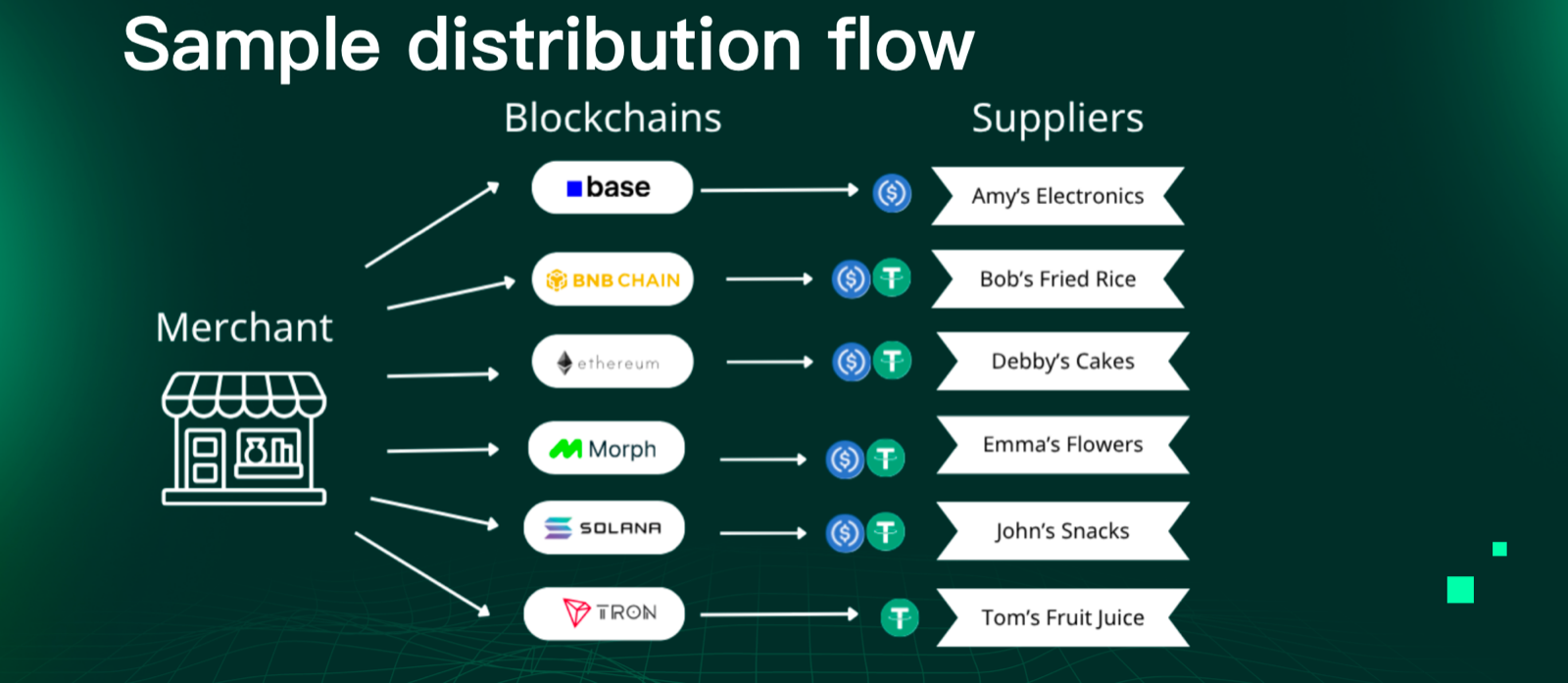
Paydify Payout lets merchants push funds from their platform balance to third-party recipients:
- On-chain wallets (stablecoin / Crypto Withdraw) — P2P user withdrawals, KOL tipping, cross-border settlement.
- Bank accounts (fiat / Fiat Withdraw) — payroll, cross-border B2B settlement, supplier payouts.
Funds are drawn from your Paydify platform balance. The default rhythm is Deposit first, then Withdraw; if you also have Payin enabled, settled Payin proceeds land in the same balance and can be paid out directly without a separate deposit.
Key features
- Wallet management — query deposit addresses and account balances.
- Crypto Withdraw — submit single or batch on-chain payouts, track by
txnId. - Fiat Withdraw — quote, lock, submit to clearing channel, with cancel and detail endpoints.
- Webhook notifications — real-time terminal state, sharing the Payin signature scheme.
Integration steps
[Deposit]      [Crypto Withdraw]         [Fiat Withdraw]            [Result]
  top up     →   on-chain pay        or    fiat pay              →   webhook + pull
Step 1 — Deposit to the Paydify account
If you only use Payout (no Payin), you must first move stablecoin from your own wallet into your Paydify platform account.
1.1 Get a deposit address
For every (App + chain) pair, Paydify generates a permanent dedicated deposit address right after KYC.
- Portal: App Management, get the merchant's dedicated deposit address; switch by chain.
- API:
POST /payout/v1/wallet/address, passingnetwork(trx/eth/bnb, etc.).
The response lists the supported currencies and the on-chain address. See Query deposit address.
1.2 Register a deposit allowlist (optional)
To prevent funds from unknown sources being credited to your balance, you can register trusted sender addresses in the Portal:
- Fixed sources (e.g. company treasury wallet): strongly recommended — blocks mistakes and phishing.
- Highly distributed sources (e.g. retail user top-ups): the allowlist becomes expensive to maintain; you may skip it.
- Without an allowlist, every inbound transfer to the deposit address is auto-credited.
1.3 Send the on-chain transfer
Send funds from your own wallet to the deposit address. Typical settlement time per chain:
| Chain | Typical confirmation |
|---|---|
| Kaia | 1–2 minutes |
| TRON | 1–3 minutes |
| BNB Chain / Solana / Base | 1–5 minutes |
| Ethereum | 3–10 minutes |
Paydify's on-chain listener captures the event and books it:
- Allowlist match (IN) → auto-credited, balance available.
- No match / no allowlist configured (OUT / NO_CONFIG) → funds enter
FROZEN; merchant manually releases or refunds via the Portal.
1.4 Review deposit history
- Portal: Transaction Query → Deposit history, filter by chain / state / time.
- Deposit state machine:
INIT → FROZEN → UNFROZEN → DEPOSITED(success), or... → REFUNDING → REFUNDED(returned).
Step 2 — Submit a Crypto Withdraw
Endpoint: POST /payout/v1/withdraw/apply — see Submit withdrawal.
Rules:
- Idempotency —
mchWithdrawIdis required and must be unique; repeated requests with the same key return the first result. - Balance check — insufficient balance returns
INSUFFICIENT_BALANCEsynchronously; no async flow is triggered and the balance is not deducted. - Gas — by default Paydify deducts gas from
amount(i.e.amountrepresents what the recipient receives, and Paydify chargesamount + gasagainst your balance). Contact your BD if you need a different fee model. - Irrevocable — once broadcast, a withdrawal cannot be rolled back. Add a second approval step for large payouts.
- Batch — for payroll-style flows use Batch apply to submit multiple withdrawals at once.
- Single lookup — query by
mchWithdrawIdorwithdrawTxnIdvia Withdrawal detail.
Step 3 — Submit a Fiat Withdraw
Fiat payouts require an extra quote step, because the FX rate must be locked before the user confirms. See Fiat withdraw.
| Stage | Endpoint | Notes |
|---|---|---|
| Quote | POST /payout/v1/fiat-withdraw/quote | Provide a USDT → fiat (or reverse) amount; returns a quote with rate, fee, expiry (default 60 s). |
| Lock & apply | POST /payout/v1/fiat-withdraw/apply | Submit quote ID + recipient (name / bank / account / country). Paydify debits the balance and forwards to the clearing channel immediately. |
| Cancel | POST /payout/v1/fiat-withdraw/cancel | Only PENDING orders can be cancelled; funds return to balance. |
| List / detail | POST /payout/v1/fiat-withdraw/list / detail | Filter by merchant order / state / time. |
Fiat rules:
- Settlement time depends on the recipient bank's clearing window — typically T+1 to T+5.
- Wrong recipient details (account / name mismatch) will fail clearing; funds return to balance and a fail fee is charged.
- Expired quotes must be requoted.
- Some countries impose per-transaction caps or recipient-type restrictions; confirm with your BD up front.
Step 4 — Receive the result
Paydify pushes the final state to your configured notificationUrl via webhook, using the same signature scheme as Payin — see Webhook.
state values: PENDING (submitted, awaiting broadcast) → SUCCESS (chain / bank clearing done) / FAILED (funds returned to balance — check errorMsg).
Belt and braces:
- Webhook is the primary path — pushed on every state change with minimal delay.
- Pull is the fallback — if your callback endpoint is briefly unreachable, reconcile with Withdrawal detail or Fiat withdraw detail.
API endpoints
| Endpoint | Description |
|---|---|
POST /payout/v1/wallet/address | Query deposit address |
POST /payout/v1/wallet/balance | Query account balance |
POST /payout/v1/withdraw/apply | Submit a single crypto withdrawal |
POST /payout/v1/withdraw/detail | Query withdrawal detail |
POST /payout/v1/batch/apply | Submit a batch withdrawal |
POST /payout/v1/batch/query | Query a batch withdrawal |
POST /payout/v1/fiat-withdraw/quote | Get a fiat withdraw quote |
POST /payout/v1/fiat-withdraw/apply | Submit a fiat withdrawal |
POST /payout/v1/fiat-withdraw/cancel | Cancel a fiat withdrawal |
POST /payout/v1/fiat-withdraw/list | List fiat withdrawals |
POST /payout/v1/fiat-withdraw/detail | Get fiat withdrawal detail |
Authentication
All Payout API endpoints use the same authentication mechanism as the Payin APIs. See Signature for details.